Midi2Dmf Deflemask Midi Converter
A downloadable tool
Convert midi files to Deflemask format (DMF) for use with your Sega Genesis projects and other compatible Deflesmask systems. The exported DMF can also be opened in FurnaceTracker.
Features
- Configurable Instrument Mapping and reusable configuration profiles
- Song level transposition and per-channel Octave transposition
- Midi Analysis mode to see what's in the MIDI
- 100 FM Synthesis Instrument presets from Beatscribe's personal collection (you're free to use anywhere)
- Chord splitting across multiple channels (its automatic, just tell it how big of a chord it can make!
- Comprehensive manual with details.
The current version only loads FM instruments, but it makes a placeholder instruments for SN instruments and puts the sample effect designation (1701) in place when mapped for samples, so you just have to add the samples and load SN instruments.
Free demo only has one instrument and no mapping, but its still better than manually laying down notes.
Works in Windows, Mac and Linux with Python 3 install.
No coding or digital audio workstation experience required!
Quick Start
On a Windows system, after installing Pyhton, just drag and drop a MIDI onto convert. The tool will install needed libraries on demand. Thats it!
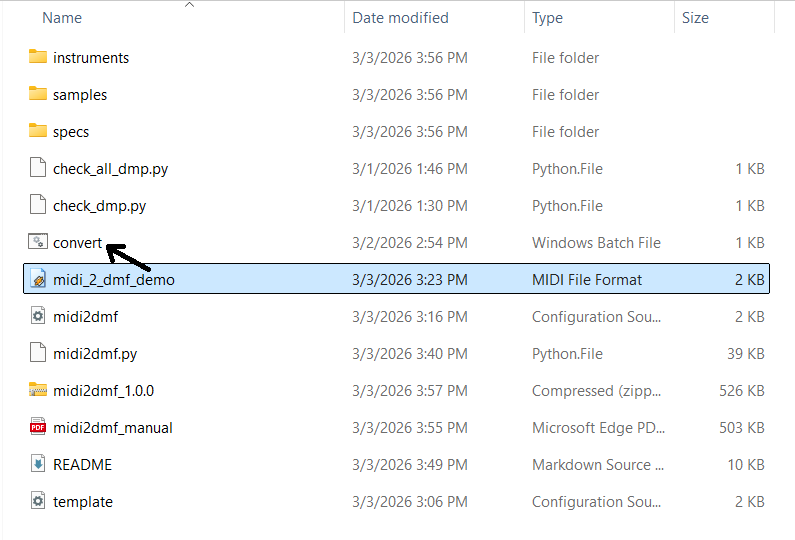
You can also run via command line:
python midi2dmf.py input.mid output.dmf
Disclaimer:
Some midis simply do not convert properly. If you are downloading midis of popular songs it is suggested you try various versions to find the best results. The best results come using the mapping config correctly. No conversion will sound as full or impressive as a composition in the Native tracker done from scratch.
If you are planning to import a single song and going to be very upset if it doesn't work perfectly, message me on Discord @beatscribe, I will let you know if it converts well and give you some manual mapping tips. I'd rather have this than someone asking for refunds.
Full disclosure: I based this on midi2uge which was written from scratch but I used Claude AI to add new features and help me troubleshoot.
Purchase
In order to download this tool you must purchase it at or above the minimum price of $6 USD. You will get access to the following files:
Download demo
Development log
- Minor Update - Convert.batMar 10, 2026
- Added Tempo Adjusting Section to ManualMar 05, 2026
Comments
Log in with itch.io to leave a comment.
hi. i love your tool. i want to knw does it convert drums too?
it does , but you need to add the drum samples after it makes the dmf, it can’t load them. See the manual. It’s best to move your midi drums to c c# d D# E before converting to avoid a lot of editing.
thank you!
this is incredible. presumably this works just as well for gbstudio music? as in four channel midi into this to covert out the other side? thank you for making this.
Im glad you like it! For gb studio though you want to use this tool: https://beatscribe.itch.io/midi2uge-hugetracker-midi-convertor
Great tool! I quite dont understand how to add the percusion samples tho...
so if you're using Sega Genesis format in Deflemask, usually you assign drum channel from the midi to FM6, if you did it right you'll see the 1701 effect in the effect column of FM6, now you double click samples in the instrument window, and add your samples in. Keep in mind if your drums arent like C, C#, D, D#, you might have to move notes around to get the right sample to play where expected (meaning if your hi hat sample is C# but your midi had hi-hat on F#, youll have to change all the F# to C#)
I love midi2uge and I wasn’t expecting this tool at all. Considering how much midi2uge has improved with each update, I can’t imagine how many new surprises there will be, but so far this tool means a huge time saver for me. 11/10
thanks for your support ! I learned a lot from midi2uge and tried to incorporate some of it here
For me the convert.bat is broken due a missing directory change before calling the Python script. Windows cannot find the script due current working directory for a drag&drop operation is always the source directory of the dragged file.
it worked on my machine and the two testers (who didn’t even have python installed to begin with). Do you have python installed so it can be called from any directory in windows?
I commented the the first line of the batch to show the error: 9:32:44,74 C:\projekte\sega development\midinotes > python midi2dmf.py -v "C:\projekte\sega development\midinotes\OVER.MID" "C:\projekte\sega development\midinotes\OVER.dmf"
python: can't open file 'C:\\projekte\\sega development\\midinotes\\midi2dmf.py': [Errno 2] No such file or directory
The call is not executed in the correct directory. This isn't an issue of the python installation, it is wrong assumption what is the current working directory.
You're totally correct. Without being told (the directions don't say) the testers always put their test MIDIs in the root folder. I did too. I have updated the convert.bat to work regardless of where the MIDI is. Thanks for bringing this to my attention. Sorry about that.
I'm so excited that this exists. I had to go as far as to learn to write music in Deflemask myself because existing conversion tools didn't cut it. Not that learning Deflemask is a bad thing, but nonetheless thank you for developing a new tool :)
Deflemask is great but in general, laying dow notes in trackers after I made a mock up track to show a client just feels so redudant. I mostly made this out of my own laziness :D I tried to make the video honest that no conversion is 100% perfect out the box, but anything beats spending two hours laying down notes.